Marketing

Don't Leave Guests on Read: Restaurant Email Marketing That Actually Converts

Social posts vanish. Marketplace apps bury your name. Email sits in the inbox until Tuesday lunch. Here's how independents build the list, send without spamming, and get a reply that turns into an order.

Katie Carswell

Katie Carswell

Account & Social Media Manager

8 min read
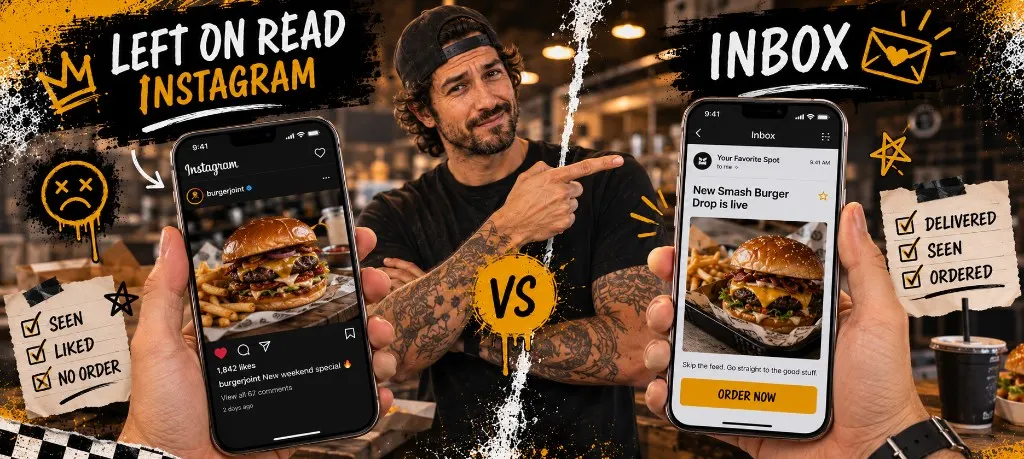
Split comparison of left-on-read Instagram engagement versus an inbox email with an order button, with a restaurant owner pointing to the inbox side

TL;DR

Capture email at direct checkout with a soft incentive, not a wall. Run three campaign types: new menu, slow-night push, and win-back after guests go quiet. Cap marketing sends around four per month for most single-location shops. Track clicks and attributed orders, not applause. Audit your stack, size your campaign budget, and steal the copy templates below before you bleach the whole list with "URGENT."

You have 2,400 Instagram followers and zero way to reach them when it's raining on a Wednesday. That's the "left on read" problem at restaurant scale. You posted. They double-tapped. Nobody ordered. Email fixes the part social never will: one send to people who already bought from you.

SMS owns the same-day "we're at the lot" drop. Email owns the story, the catering pitch, and the win-back with a link that doesn't evaporate in twenty-four hours. Start with the customer list playbook, keep SMS compliance open for texts, and use this guide as the email hub.

~4/moMarketing email cap most independents should start with
~30 daysCommon first email win-back window after last order
1 fieldOptional email at checkout beats a five-field signup form

Why Email Still Beats Social for Owned Reach

You don't own Instagram. You own the inbox of everyone who typed an email at checkout. That list survives algorithm changes, account hacks, and the day TikTok decides your taco reel is for nobody within 40 miles.

Email fits the longer message: new menu drops, catering packages, holiday pre-order windows. SMS fits one sentence and a link. Use both. Don't make them fight over the same "quiet Tuesday" line like siblings in the back seat.

Before you write a subject line, check whether email is even in your stack or if you're still renting reach from platforms that don't return your guests' contact info.

Stack audit

Marketing tool audit

Check the tools you are currently paying for. See if your stack has gaps or waste.

Your stack

0 of 7 categories covered

Check what you currently use to see gaps and recommendations.

Capture Emails at Checkout (Without Killing Conversion)

Required email fields make mobile checkout feel like a DMV form. Optional email with a one-line reason works: "Send me receipts and occasional perks." Pre-check only where the law allows. Always show unsubscribe on marketing sends.

  • Optional field on direct checkout, not a separate signup page guests never finish
  • Small perk for first email capture: free side or drink, not 20% off forever
  • Receipt email is transactional. Marketing needs clear opt-in.
  • Segment early: ordered in last 30 days, idle 30–90, catering leads

If you're still collecting the list itself, the first-party data guide walks through QR, bag stickers, and checkout capture without buying sketchy CSVs.
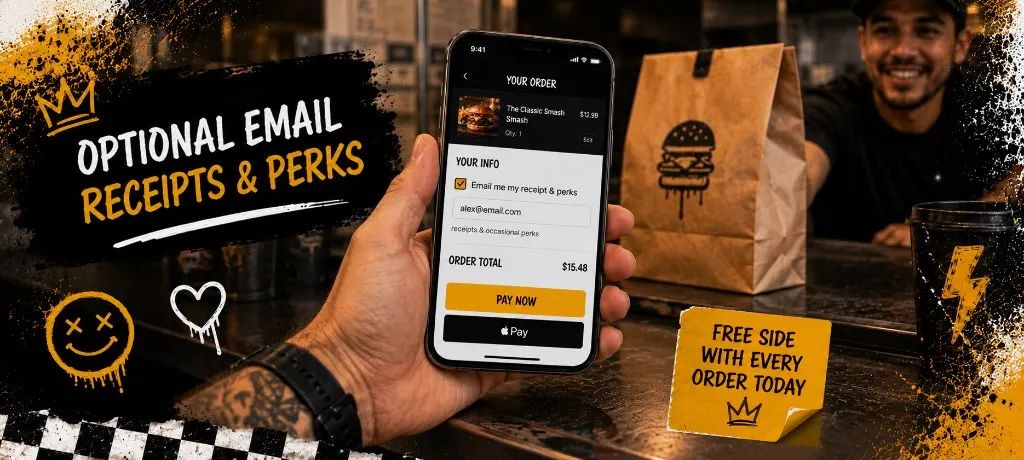
Checkout screen on phone showing optional email field with a short incentive line beneath it
One optional field beats a loyalty form guests abandon at the pay button.

Campaign Types That Actually Get Orders

Pretty newsletters without a button are digital placemats. Guests skim, admire the photo, and go back to DoorDash. Every send needs one job and one link.

  1. New item or LTO: One photo, three sentences, order button. Test mid-morning on a weekday for lunch crowds.
  2. Slow-night push: "Quiet tonight. Pickup in 15." Link only. No essay about your chef's journey.
  3. Catering or event: Headcount, pickup window, deposit link. Email beats SMS for office admins who forward threads.
  4. Seasonal pre-order: Holiday pans, festival caps. Deadline in the subject line so nobody can claim they missed it.

Tools are cheap compared to a bad offer. Size what you can spend on campaigns before you buy another "AI email" subscription that writes like a robot apologizing for being a robot.

Interactive calculator

Monthly marketing budget

Enter your monthly revenue. See a recommended marketing tool budget based on industry benchmarks.

Total budget

$450

Tools max

$150

Campaigns

$300

Industry benchmark: spend 3-5% of revenue on marketing. Allocate no more than 1/3 on tools and 2/3 on actual campaigns (offers, content, ads).

Win-Back Sequences (Without Looking Desperate)

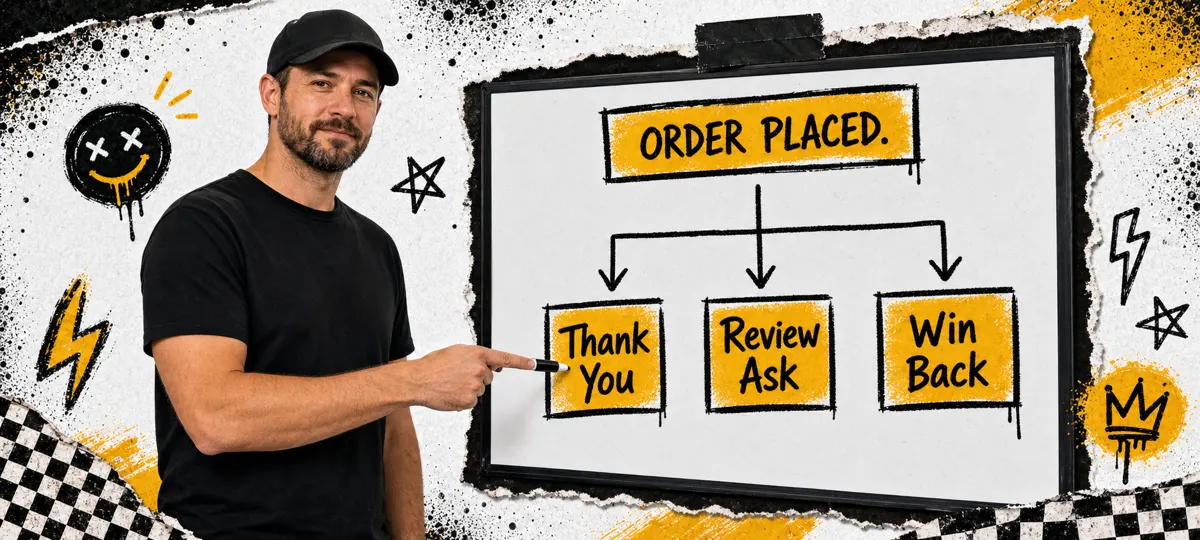
SMS often pings sooner (around two weeks idle). Email can carry a fuller offer a little later. A common email pattern: idle about 30 days gets email one (what's new + order link). Idle about 60 days gets email two (small perk, hard deadline). Idle about 90 days gets one last send, then quarterly only or a clean suppress.

Those windows are starting points, not law. Test against your own repeat cadence. Full tactics and SMS/email mix live in the win-back campaigns guide. Email carries the offer. A same-day SMS can follow for guests who opted into both.
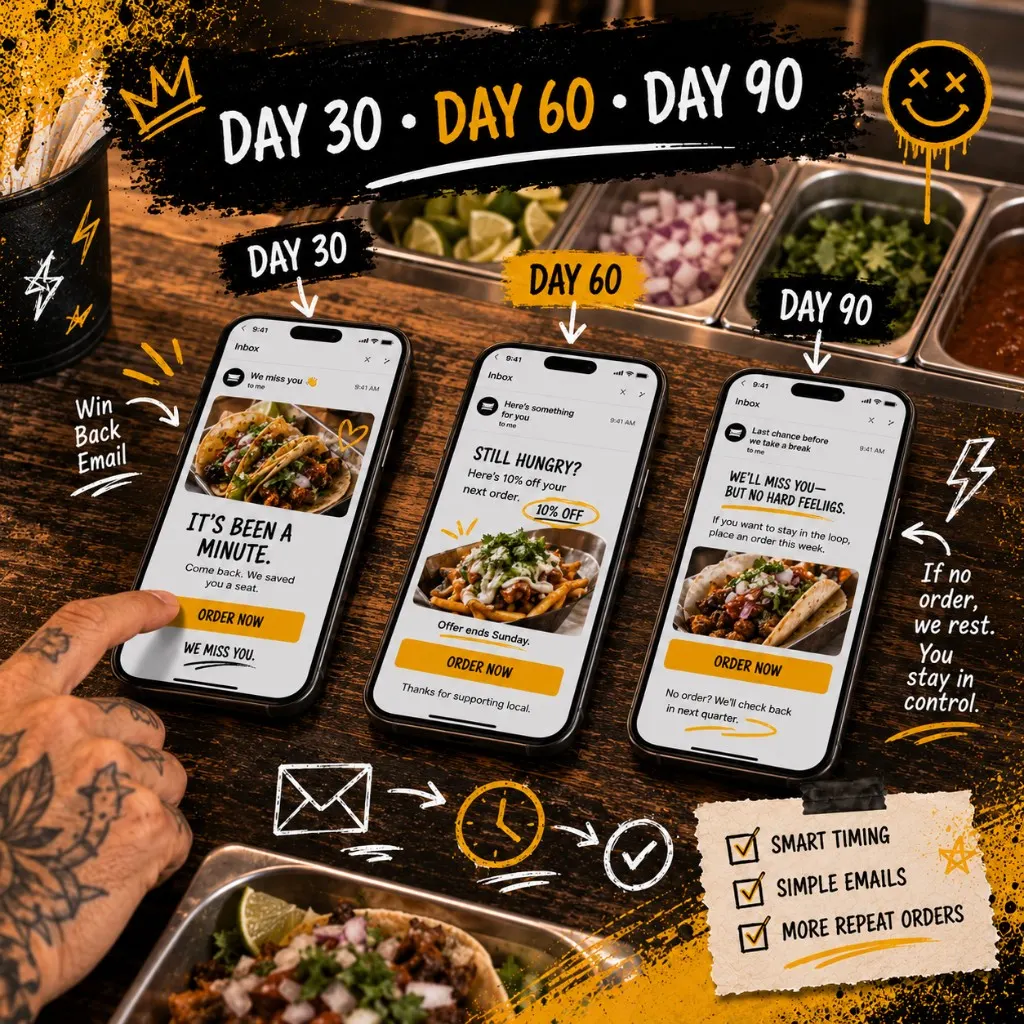
Whiteboard storyboard showing three-email win-back sequence with day 30, day 60, and day 90 labels
Three emails max for most win-backs. More starts to feel like spam with better grammar.

Frequency and Compliance Basics

Around four marketing emails per month is plenty for most single-location shops. Every marketing send needs a clear way to unsubscribe. Don't buy lists. Don't scrape Yelp. Your checkout list is enough if you treat it like a guest, not a lead dump.

Transactional stuff (receipts, order ready) is different from "we miss you, here's a free cookie." Keep the marketing path opted-in. When you're ready to send, don't stare at a blank subject line. Steal these and swap the brackets.

Copy and paste

Email copy you can paste today

Replace bracketed placeholders. One offer, one link, one deadline.

Subject: slow-night push Quiet night at [BRAND]. Pickup in 15. Body: slow-night push Kitchen's caught up and we saved you a seat in the pickup window. Order direct: [LINK] Tonight only. No app middleman. Subject: win-back (~30 days idle) We miss your usual order, [FIRST NAME] Body: win-back It's been a minute since your last order. [NEW ITEM / LTO] is on the board this week. Order: [LINK] Prefer texts instead? Reply STOP on any marketing text you get from us, or unsubscribe on emails anytime. Subject: new item / LTO [ITEM NAME] just dropped. Order before we 86 it. Body: new item / LTO One photo. One reason. No essay. [ITEM NAME]: [ONE SENTENCE] Order now: [LINK] Available through [DATE] or until we sell out.

Subject: slow-night push

Quiet night at [BRAND]. Pickup in 15.

Body: slow-night push

Kitchen's caught up and we saved you a seat in the pickup window. Order direct: [LINK] Tonight only. No app middleman.

Subject: win-back (~30 days idle)

We miss your usual order, [FIRST NAME]

Body: win-back

It's been a minute since your last order. [NEW ITEM / LTO] is on the board this week. Order: [LINK] Prefer texts instead? Reply STOP on any marketing text you get from us, or unsubscribe on emails anytime.

Subject: new item / LTO

[ITEM NAME] just dropped. Order before we 86 it.

Body: new item / LTO

One photo. One reason. No essay. [ITEM NAME]: [ONE SENTENCE] Order now: [LINK] Available through [DATE] or until we sell out.

Five Email Mistakes That Leave You on Read

  1. No order button. Pretty newsletter, zero clicks. Guests aren't spelunking for your URL.
  2. Same blast to everyone. Catering leads and Tuesday taco regulars need different copy.
  3. Weekly sends with nothing new. You train people to ignore you like background music.
  4. Subject lines that lie. "URGENT" for a slow Tuesday is how you earn a spam folder roommate.
  5. Never measuring orders. Opens can lie. Clicks and attributed orders tell the truth.

Mobile is where most of these get opened. One photo. Short copy. Order button above the fold. If they have to pinch-zoom to find "Order," you've already lost the lunch window.
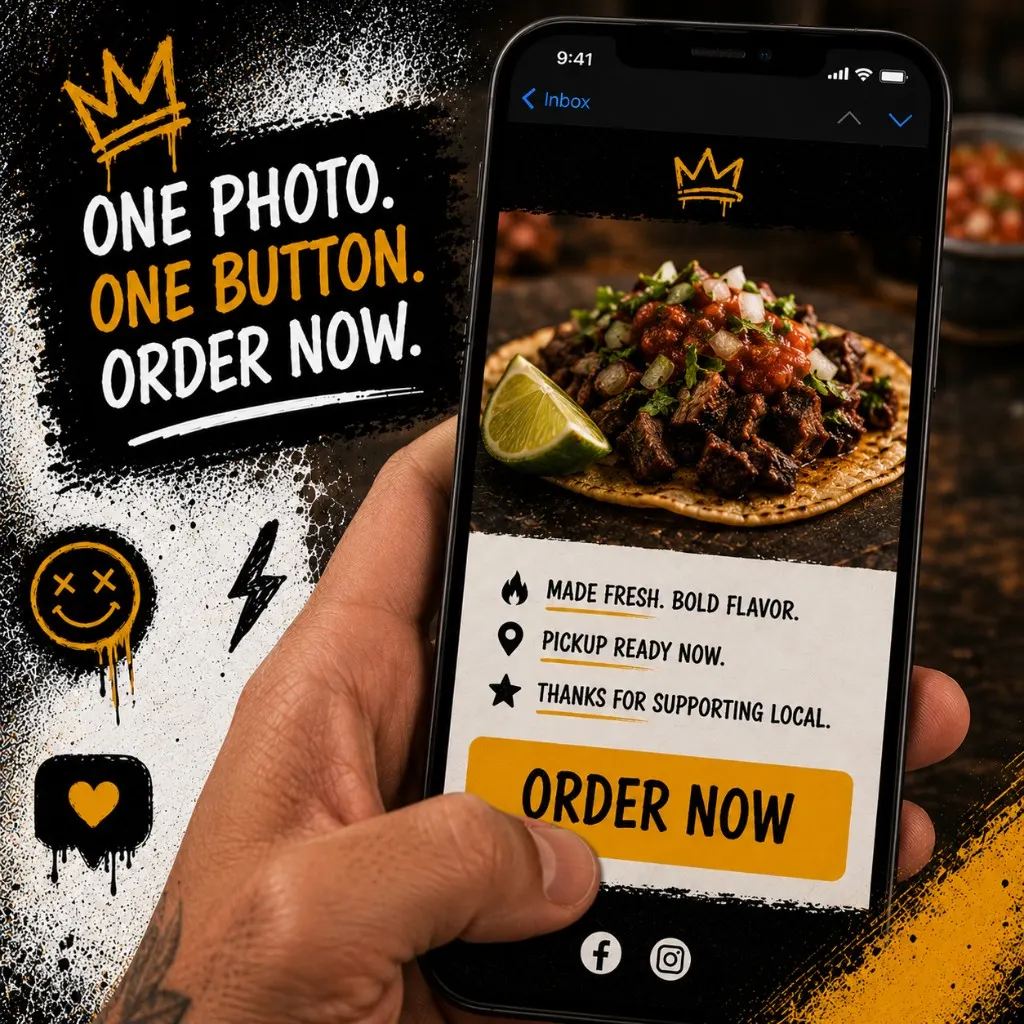
Phone showing opened restaurant marketing email with prominent order button and single menu photo
One photo. Short copy. Order button where a thumb can hit it.

Templates

Common questions about restaurant email marketing

1. How do I build a restaurant email list from scratch? Capture email at direct checkout with an optional field and a clear reason. Add in-store signup at pickup with a QR to a simple form. Don't import bought lists. Start sending only when you have something worth opening: new item, slow night, or win-back perk. 2. How often should restaurants email customers? Start around one marketing email per week max, or about four per month. Increase only if clicks and orders stay healthy. Win-back emails are spaced weeks apart, not daily drips. 3. What should a restaurant win-back email say? Short. Acknowledge time since last order. One new reason to return: LTO, seasonal item, or small perk with a deadline. Single order button. No six paragraphs about your origin story. 4. Is email or SMS better for restaurants? SMS for same-day urgency and truck location drops. Email for menu launches, catering, longer win-backs, and guests who don't want texts. Use both with separate opt-ins. Don't blast the same line on both channels five minutes apart. 5. Does Outbites include email marketing? Yes. Outbites includes email tools on direct orders alongside SMS, loyalty, and promos. You send to guests who opted in through checkout and campaigns you control, not a marketplace list you'll never export.
Capture email at direct checkout with an optional field and a clear reason. Add in-store signup at pickup with a QR to a simple form. Don't import bought lists. Start sending only when you have something worth opening: new item, slow night, or win-back perk.
Start around one marketing email per week max, or about four per month. Increase only if clicks and orders stay healthy. Win-back emails are spaced weeks apart, not daily drips.
Short. Acknowledge time since last order. One new reason to return: LTO, seasonal item, or small perk with a deadline. Single order button. No six paragraphs about your origin story.
SMS for same-day urgency and truck location drops. Email for menu launches, catering, longer win-backs, and guests who don't want texts. Use both with separate opt-ins. Don't blast the same line on both channels five minutes apart.
Yes. Outbites includes email tools on direct orders alongside SMS, loyalty, and promos. You send to guests who opted in through checkout and campaigns you control, not a marketplace list you'll never export.

Email isn't dead for restaurants. Bad email is dead. Capture at checkout, send with a reason, win back idle guests before they're gone for good, and measure orders not applause. Audit the stack, size the budget, paste a template, and ship one campaign this week. Leave the "left on read" energy for group chats, not your regulars.

Email on the orders you own

Outbites captures guest email at direct checkout and gives you SMS, loyalty, and campaigns in one stack. Build the list while you take orders, not after.

Start with Outbites
Tags: restaurant email marketing restaurant email list how do I send automated emails to bring restaurant customers back restaurant win back email independent restaurant marketing
Katie Carswell

Katie Carswell

Account & Social Media Manager

Sharing firsthand stories and lessons learned from running an independent restaurant: margins, marketing, and owning your customer relationships.

Editorial note Marketing Published July 14, 2026

How this guide was put together

This article was written for independent food businesses looking for practical ways to grow direct orders, repeat visits, and customer relationships. We keep the advice operator-focused, avoid generic playbooks, and update posts when the restaurant marketing landscape changes.
Topics covered restaurant email marketing restaurant email list how do I send automated emails to bring restaurant customers back restaurant win back email

Continue Reading

More from the Blog